Docs / Get started
Your first sync, step by step
What you see at each step, from trying Graft on a public fork to your first pull request. Each picture is the real page; the numbers point at the parts the text explains.
The dashboard pictures from step 5 on use example copies under the account you@example.com. The pages, words and buttons are the ones you get.
- 01Try it on a public fork
- 02Request an invite and sign in
- 03Install the GitHub app
- 04Connect a repository
- 05Your first sync
- 06The pull request
- 07When a copy stays
- 08Conflicts on Free and Premium
- 09Questions that need you
- 10Connect Claude Code
-
01Try it on a public fork, no sign-up
Paste a public GitHub fork into the box on the try page or the home page. Graft carries the fork's changes onto upstream's newest release in a sandbox and runs the tests. It takes a few minutes, and nothing is pushed anywhere.
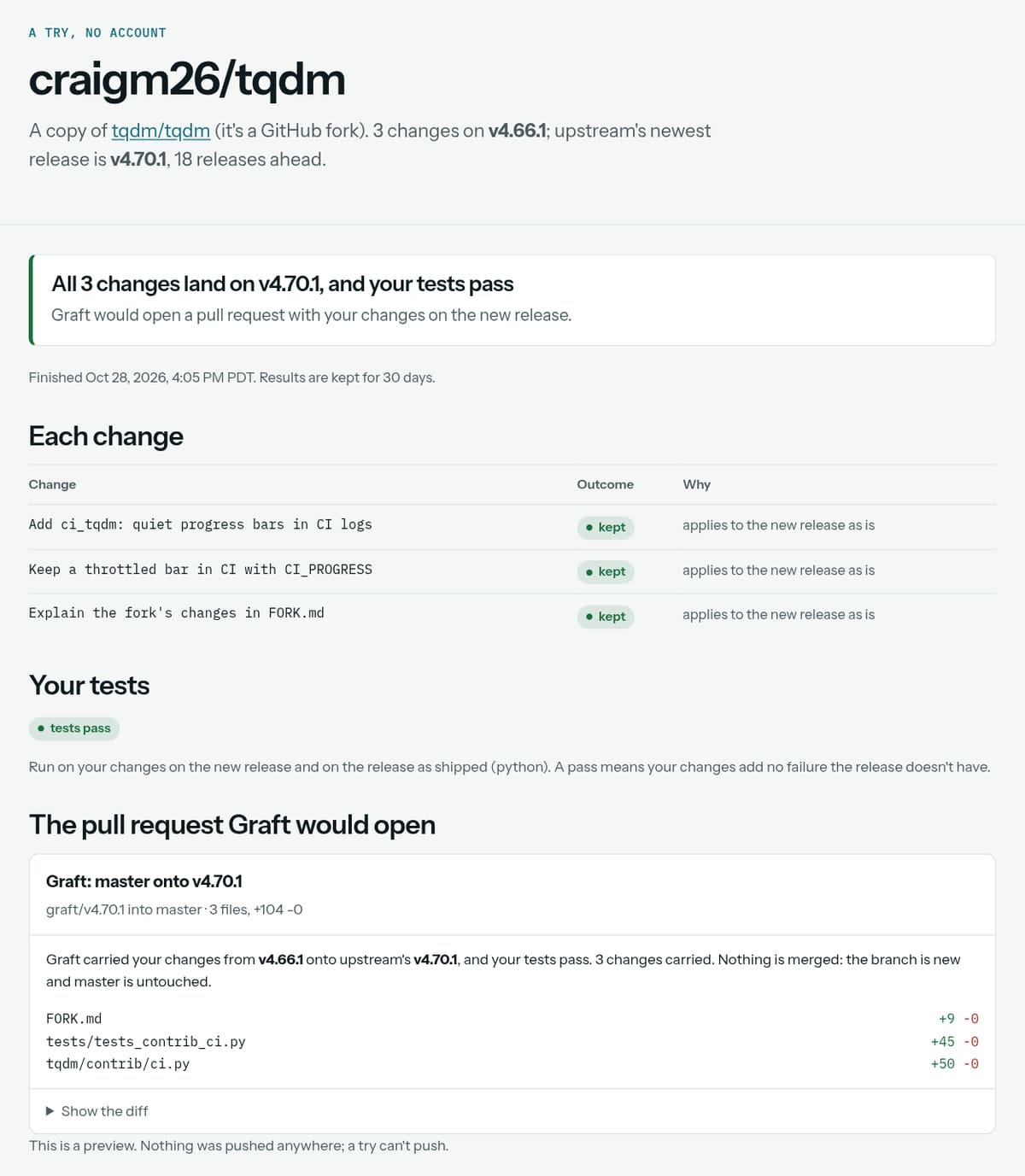
- The verdict. Whether every change lands on the new release, and what the tests said.
- Each change. One row per change: kept as it was, dropped because upstream has it now, or rewritten. Each row says why.
- The tests. Graft runs them on the release as shipped and again with your changes. Only a failure your changes add counts against the move.
- The pull request it would open. A preview. A try can't push, so this is as far as it goes.
A result stays at its link for 30 days. To have Graft do this on every release, connect the copy (steps 2 to 4).
-
02Request an invite, then sign in from the email
Use the form at Request an invite. Give your email, and if you like, the copy you want kept current. The first 50 people get in right away; after that, we invite people a few at a time. Either way, an email brings a one-time sign-in link.
To sign in again later, go to sign in and give the same address.
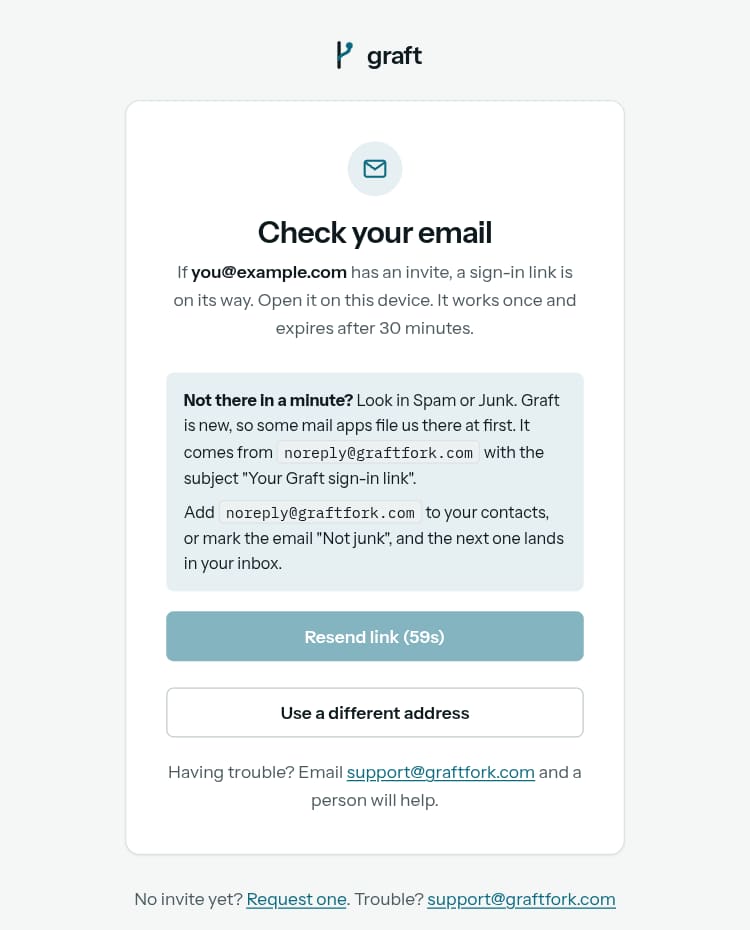
- The address the link went to. There's no password. Open the link on the same device.
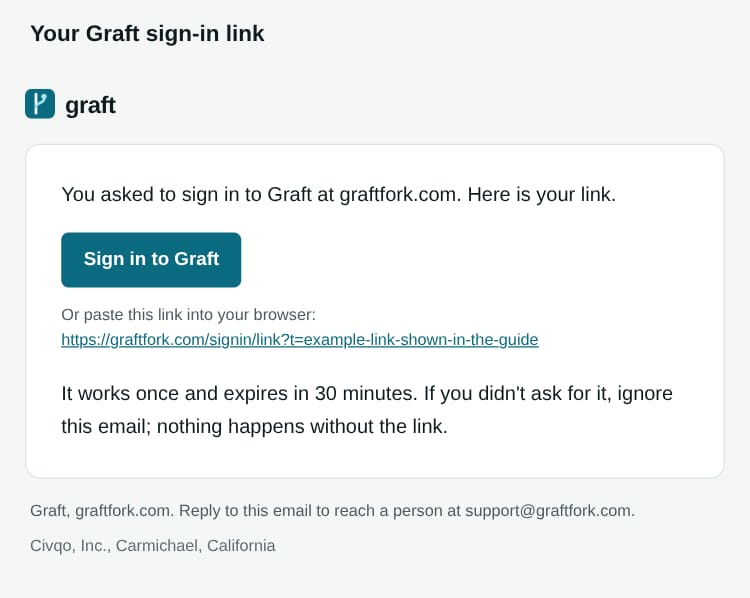
- Sign in. The link works once, for 30 minutes. After that, ask for a new one. You stay signed in for up to 30 days.
-
03Install the GitHub app
Your dashboard opens empty. Press Install Graft on GitHub.
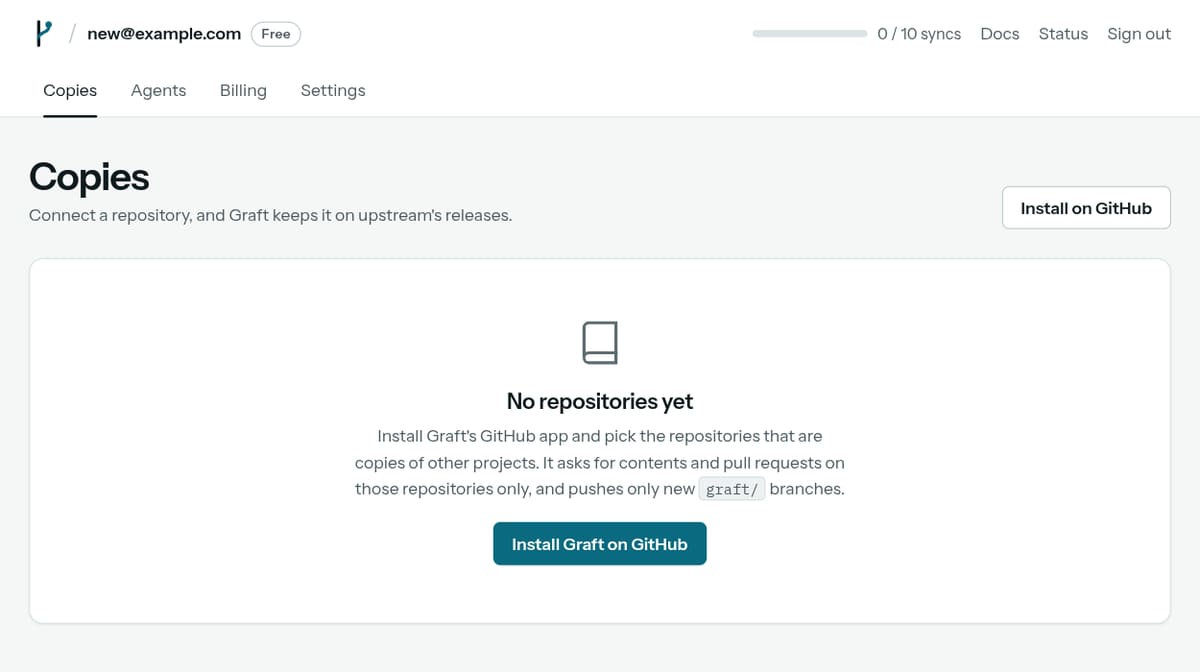
- Install Graft on GitHub. This opens GitHub, where you choose the account and the repositories.
- What it asks for, in one line: contents and pull requests, on the repositories you pick.
GitHub asks where to install Graft. Pick your account, then pick only the repositories you want kept current. You can add or remove them later on GitHub.
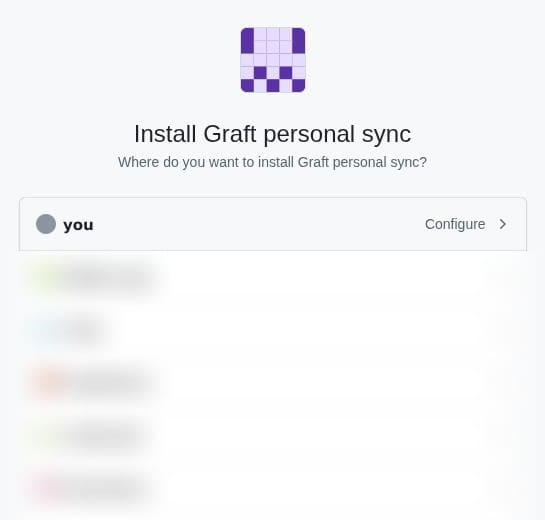
- Your account. Other accounts you belong to are listed below it (blurred here).
The next GitHub screen lists the permissions before you approve them: contents and pull requests, read and write, and metadata, read-only. Graft uses them to push new branches named
graft/...and open pull requests. It never pushes to your own branch. It asks for nothing else: no administration, no workflows.If a release changes files in
.github/workflows, GitHub won't let the app push it. The copy's page then offers a second, optional app that may write those files. Without it, Graft moves you to the newest release it can push. See what Graft can access. -
04Connect a repository
Back in the dashboard, each repository you picked gets a card. Graft has already looked at it: the upstream it follows, the release your changes sit on, and how to run your tests. One press turns on auto-sync and starts the first sync.
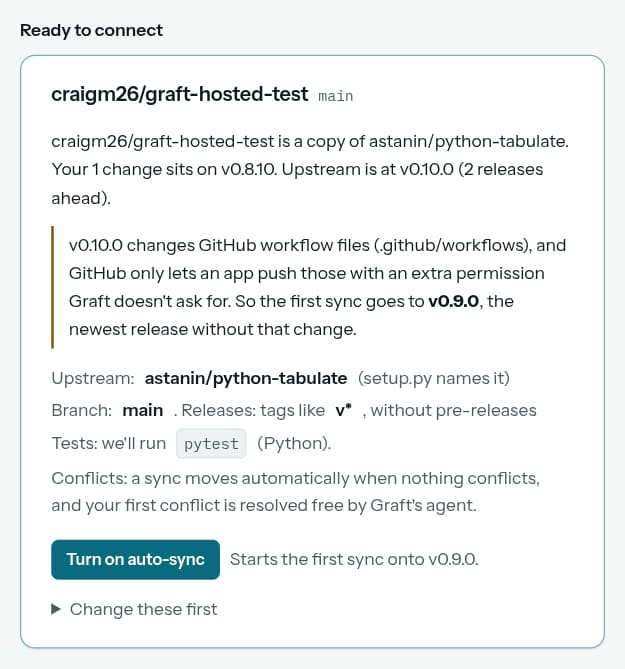
- What Graft found. Whose copy this is, how many changes you have, the release they sit on, and how far upstream has moved.
- Anything to know first. Here, upstream's newest release changes workflow files, so the first sync goes to the release before it.
- The upstream, and how Graft knows: a fork's parent, or the project your package metadata names.
- Your tests. Found by themselves for Python and Node. For anything else, add a
.graft.yml. - Turn on auto-sync. Connects the copy and starts the first sync. "Change these first" lets you correct anything before you do.
-
05Your first sync
A sync usually takes a few minutes. When it's done, the copy's page says what happened in one sentence, and the sync shows in its timeline. Open a sync to see each change.
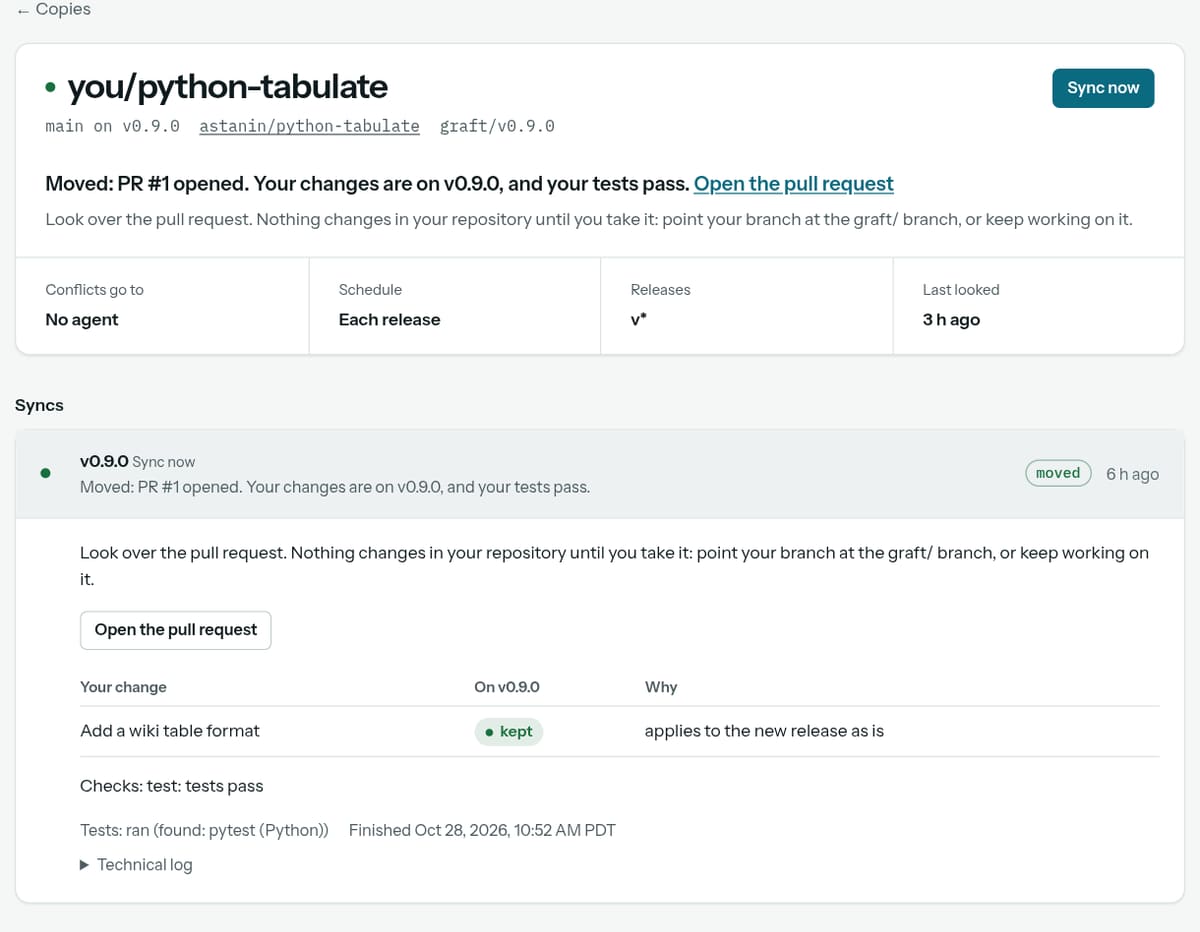
- What happened, in one sentence. Here: moved, pull request #1 opened, tests pass. A link opens the pull request.
- How the copy is set up. Who resolves conflicts, when Graft looks for releases, and which tags count as releases.
- The timeline. One row per sync, newest first, with the release it went to and how it ended.
- Each change. Kept, dropped or rewritten, and why.
- How the tests ran, and when the sync finished.
The dashboard works on a phone too. After this, Graft looks for new releases once a day and syncs by itself. You get an email each time, moved or stayed, unless you turn that off in Settings.
-
06The pull request Graft opens
When every change lands and your tests pass, Graft pushes a new branch and opens a pull request into your branch. This is the body of one Graft opened on a test copy of python-tabulate, moving one change from v0.8.10 to v0.9.0, with the wording Graft uses now.
Graft: main onto v0.9.0graft/v0.9.0 into main, opened by Graft's GitHub appGraft carried your changes from v0.8.10 onto upstream's v0.9.0, and your tests pass. Nothing was merged: this branch is new, and
mainis untouched.Change Outcome Why Add a wiki table format kept applies to the new release as is Checks: test: tests pass
Note: moved to v0.9.0 on graft/v0.9.0; build and tests pass
To take it, point your branch at this one, for example
git push --force-with-lease origin graft/v0.9.0:main, or keep working here. Merging this pull request works too, as long as the merge itself changes nothing. Graft keeps followingmaineither way: anything you commit there is carried next time.Opened by Graft, private beta.
- From which release to which. And a reminder that your own branch hasn't changed.
- One row per change, named by your commit's subject, with what happened to it and why.
- What your tests said about the new release with your changes on it.
- How to take it. Point your branch at the new one, or merge if the merge itself changes nothing. Graft keeps following your branch either way.
Nothing in your repository changes until you take it. Look it over like any pull request, and run anything you like on the branch first. More in taking a move.
-
07When a copy stays
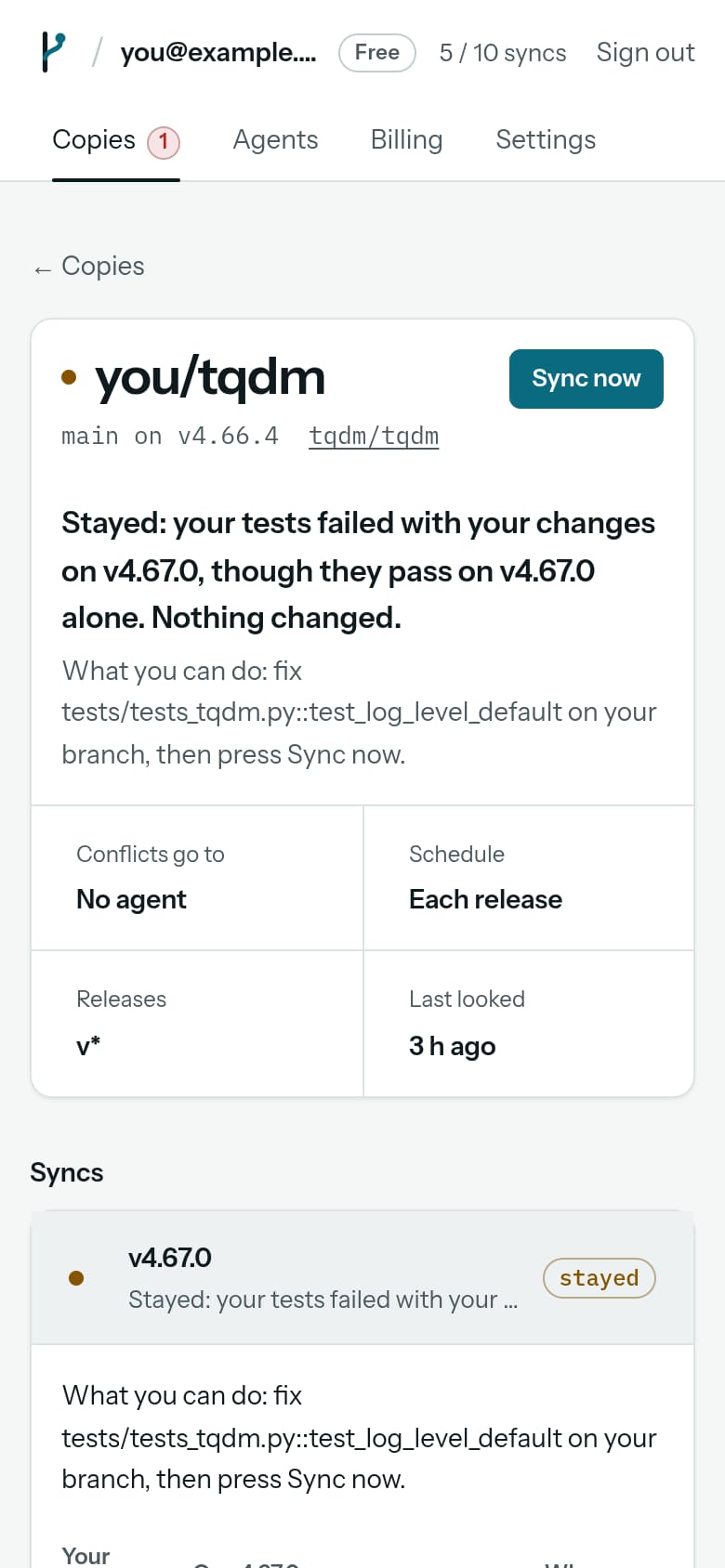
A copy stays on its release when Graft can't show that the move is safe. Nothing is pushed, and the page says why and what you can do. Here, one of three changes broke a test on the new release.
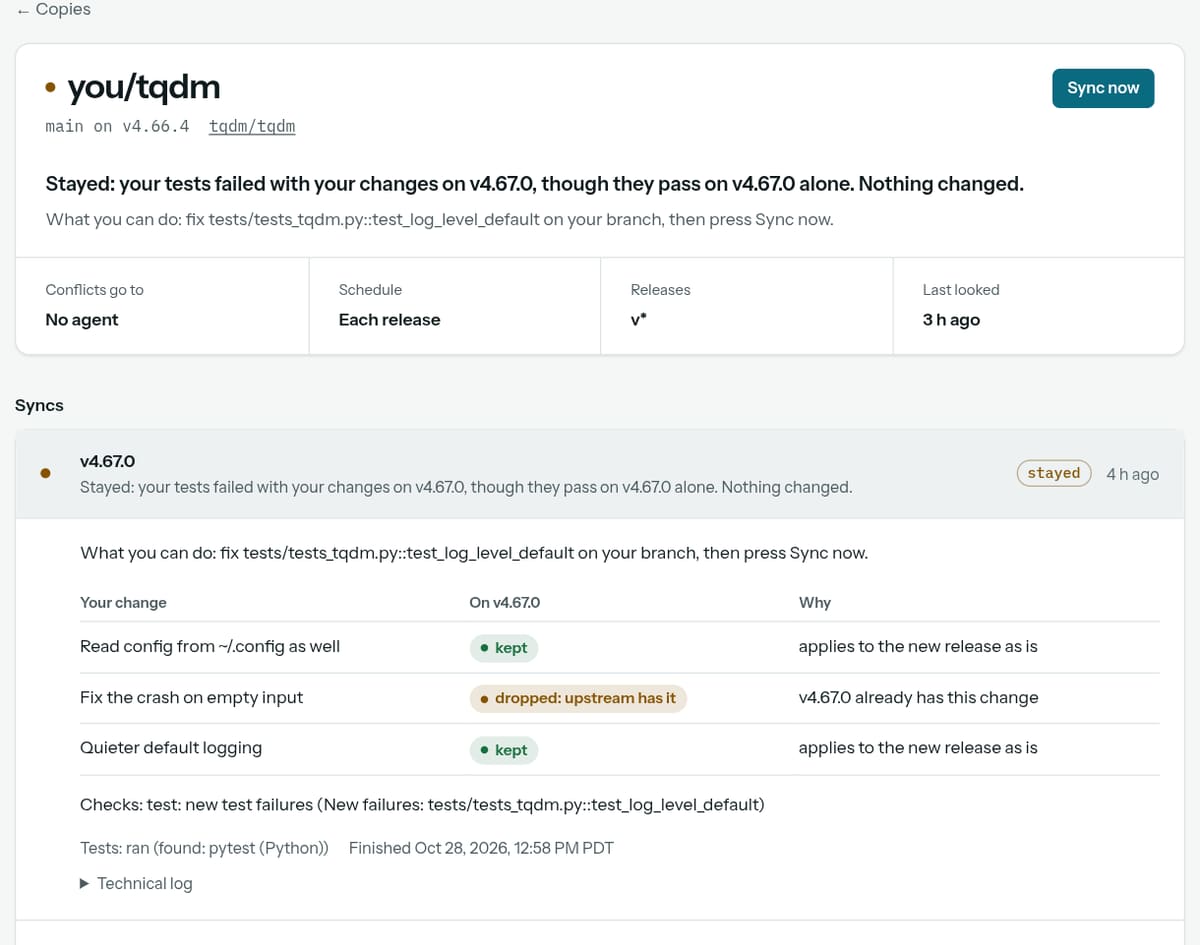
- Why it stayed. Your tests pass on the new release as upstream shipped it, and fail with your changes on it. So the failure comes from the carry.
- What you can do. Each reason comes with a next step. Here: fix the test, by name, on your branch.
- Dropped. Upstream fixed the same thing, so your change isn't needed any more. That's never a reason to stay.
- The failing test, by name, so you know where to look.
Fix the test or the change on your branch and press Sync now. Other reasons to stay are a conflict with no agent set (step 8), a question for you (step 9), or tests that couldn't be set up. All of them are listed in when a copy stays.
-
08Conflicts on Free and on Premium
Most releases need no agent: every change applies, or upstream already has it. A conflict is a change that touches lines the new release changed too. Who resolves it depends on your plan and the copy's setting.
Free
A copy moves when nothing conflicts. Your first conflict is resolved free: Graft's agent takes it by itself, once. After that, a conflict stays and says so. You can also save your own Anthropic API key and pick it for the copy.
Premium, $12 a month
Graft's agent resolves conflicts automatically and checks them with your tests. $6 of agent work a month is included, with no charges beyond the price.
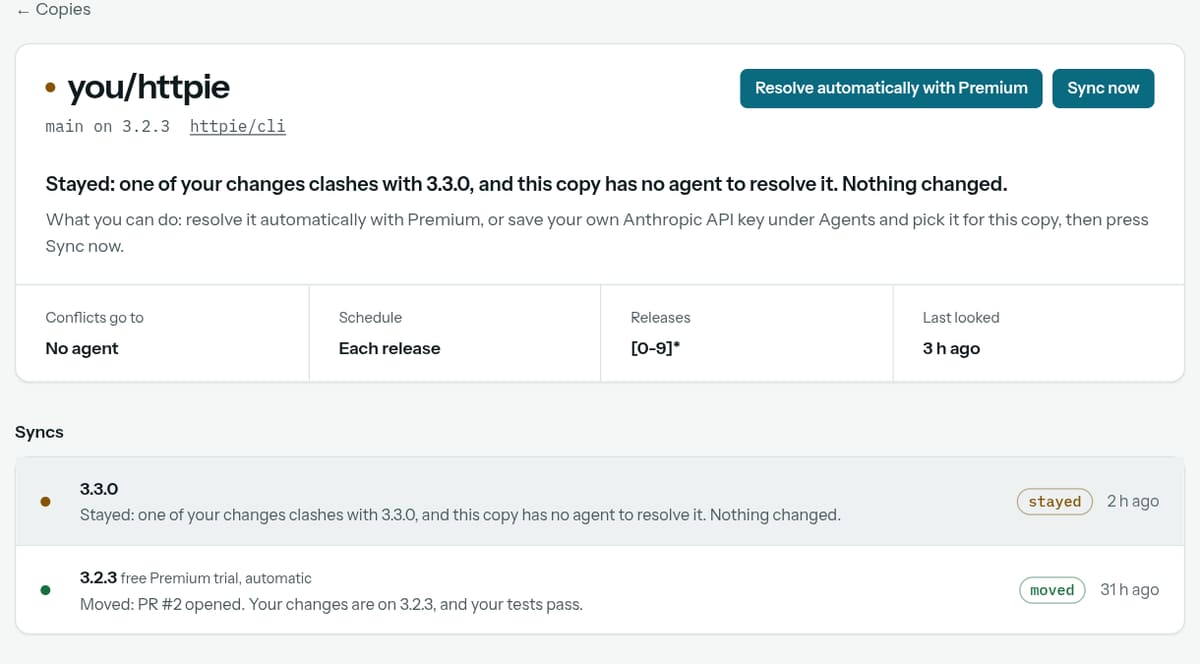
- Why it stayed. A change clashes with 3.3.0, and this copy has no agent set.
- The one action. Resolve it automatically with Premium. Or save your own API key under Agents and pick it for the copy.
- The newest sync stayed. Nothing was pushed.
- The first conflict was free. Graft's agent resolved it on the free Premium trial, by itself, and the tests passed.
Every resolution goes through your tests before anything moves, whoever wrote it. See plans and limits.
-
09Questions that need you
Some conflicts are a real choice, and asking is safer than guessing. Graft tries each option against your tests first, then shows you the options with their results. The email has the same options as links.
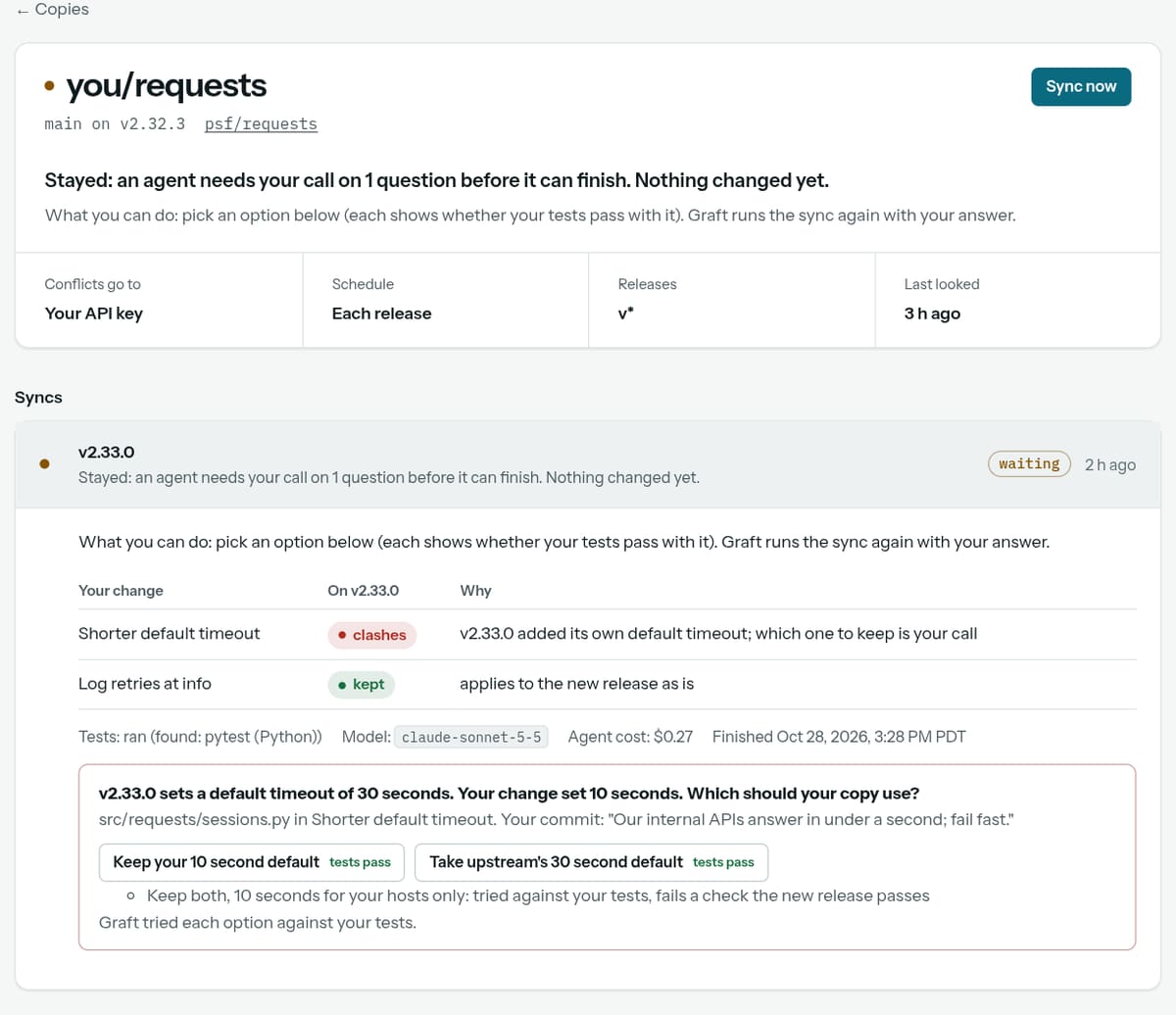
- The copy waits for you. Nothing changed yet.
- The question, with the file and the reason from your commit.
- One click answers. Only options that pass your tests are buttons. Graft runs the sync again with your answer, and that doesn't count against your monthly syncs.
- An option that failed is shown as information, not as a choice.
On Premium, when exactly one option passes your tests, Graft uses it without asking, and the report says so.
-
10Connect Claude Code
Graft's plugin lets Claude Code track your copies, start syncs, and see why one stayed. Make a token in Settings, under API tokens and agents. The page shows the token once, with the lines to paste.
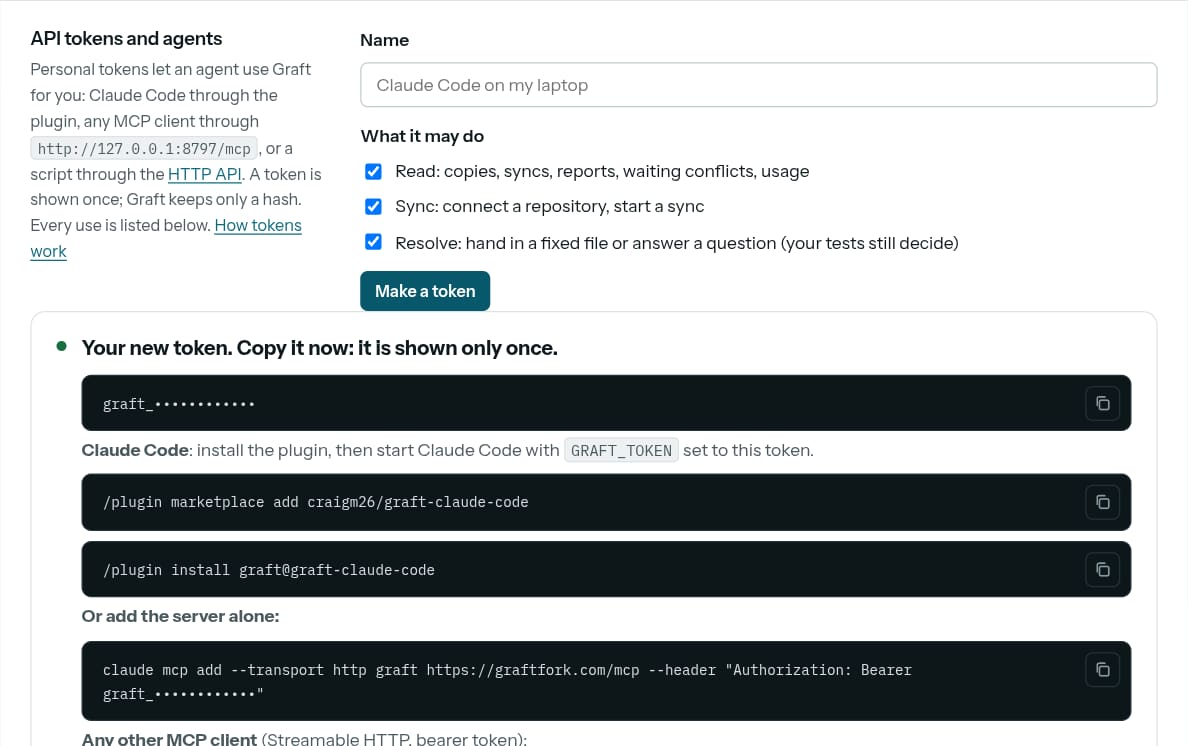
- Name the token after where it runs, and pick what it may do: read, sync, resolve.
- The token, shown once. Copy it now; Graft keeps only a hash. Ours is hidden in this picture.
- The plugin. Two lines in Claude Code.
- Or the server alone, for Claude Code without the plugin. Any MCP client works with the JSON shown below it.
In Claude Code:
/plugin marketplace add craigm26/graft-claude-code
/plugin install graft@graft-claude-code
Then, in the shell you start Claude Code from:
export GRAFT_TOKEN=graft_...
Ask Claude to "track this fork with Graft". More in agents and Claude Code.
Help
Write to support@graftfork.com. A person replies within two business days. See also getting started and how it works.